Home / How it works How it works

Playbooks, a context model, and findings you can check.

Artekis runs inside your Ignition gateway. Playbooks decide what to analyze and when, a context model tells it what your equipment is, and every run ends in findings stored with their evidence.

Playbooks

What runs, and when

A playbook is a small resource in one of your Perspective projects. It names the analysis, the plant areas it covers, when it runs (on a schedule, when an alarm fires, or from a script), a cost budget, and where the findings go. Five ship in 1.2: Ask, Alarm Health, Anomaly Watch, Incident and Gateway Health.

Context model

What your equipment is

Each plant area has a context model: its assets, their tags with units, normal ranges and limits, their alarms, your rules, links to manuals and SOPs, and how assets relate. It is what lets a run know that a pressure tag is the inlet pressure of pump 3 and what normal looks like.

Building the model

Drafted from your tag tree in seconds

The editor drafts assets from what the gateway already holds: UDT definitions and instances, the folder tree, alarm configuration and history settings. On our acceptance run it drafted 19,400 tags into 242 assets in 3.1 seconds. You review the draft asset by asset and save what you accept.


The analyses

What each playbook does

PlaybookReadsProduces
Alarm HealthThe alarm journal over the window, up to 500,000 transitions a runNuisance, stale, duplicate, priority, flood and rate findings with proposed configuration changes, and the ISA-18.2 KPIs
Gateway HealthThe last 24 hours of logs, Store and Forward, connections, devices and tag qualityWhat regressed since the previous run; the first run records the baseline
IncidentThe 30 minutes before an alarm or line stop (adjustable), across the asset and related assetsRanked causes: the first-out alarm, the first tag outside its normal range, an operator write, a configuration change, a communications loss, or unexplained
Anomaly WatchUp to 31 days of tag history for the area’s measurements, with 30 days of baseline before it, split by running, stopped, changeover and productDrift, out-of-band, stuck, rate and quality anomalies with their numbers, data-health findings about the historian itself, and for a confirmed anomaly a scored detector you can import as an alarm
AskLive gateway data, your documents and your named queries, through a fixed set of read-only toolsAn answer with a citation for each claim; an uncited answer is marked as such
Where results go

Announced where your team works

Perspective

A views pack installed into the project you choose: findings, finding detail with the evidence and proposed change, alarm KPIs, the anomaly review queue and detector view, an incident card and the Ask panel. The views use your theme.

Email and reports

An HTML digest through a gateway email profile, filtered by severity, and a scheduled PDF Alarm Health report through the Reporting module.

Tags, MQTT and scripts

A read-only tag provider with open findings and incident causes, MQTT messages through the Artek MQTT suite, and callbacks into your project library.
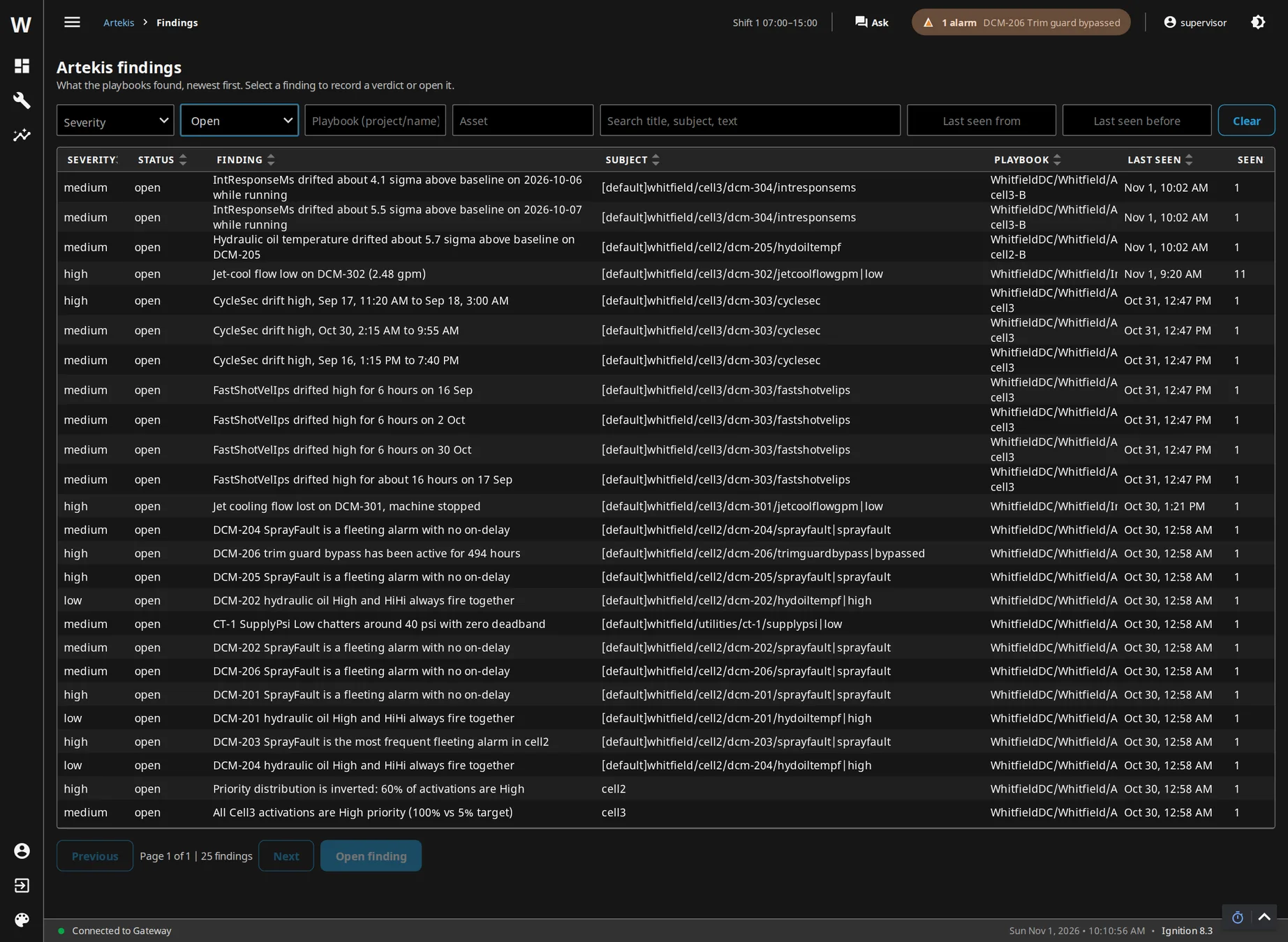
The Findings view in Perspective: findings newest first with severity, status, playbook, asset and filters
The Findings view, installed into your own project and using its theme, here the demo plant’s dark theme: newest first, filtered by severity, status, playbook, asset, text and dates.
Setup

A checklist that tells you what is missing

The Status page in the gateway shows eight setup steps judged from the gateway’s real state: database tables, connection and secret, license or trial, the module, configuration, the views pack, playbooks and the optional incident trigger. Before anything is sent to a model, Show prompt on the Test run page displays exactly what the model would see, free, with nothing leaving the gateway.

Next step

Want to know what it would find on your data? Get in touch.

Tell us about your gateway and what you want to find out. A member of our team reads every message and replies.

Contact us →